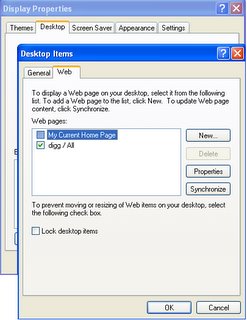
 A little known feature of Windows XP is the display of live web page on the desktop. This feature can be used to display the website of your choice right on the desktop with the content refreshing according to your wish. This active element can be turned on in the "Display Properties" dialog box (Desktop->Right Click->Properties->Desktop->Customize Desktop->Web).To set the current Home Page (in the Internet Explorer) as the active page check "My Current Home Page", or else you can addurl of your choice by clicking "New" button. You can even add an image or an html page of your choice by clicking the "Browse" button or furthur still you can add some cool active content (like Sports Update, News, Satellite Tracker etc) by clicking the "Visit Gallery Button". You are also having the option (in the properties dialog of selected content) of scheduling the active content or to run as an when you click "Synchronize", additionally it can also be specified how deep a link can be downloaded to view offline.